feat(chat): highlight a response and add the excerpt to the chat
From the PR description
Summary
Adds "Add to Chat": highlight any part of an assistant response, click the floating popup that appears, and the excerpt attaches above the composer as a removable quoted-context chip. Multiple highlights stack. The excerpts are sent as context with the next message and clear afterwards.
Shipped on all three web chat surfaces - standalone assistant chat, project assistant chat, and the tabular-review chat panel. Not the Word add-in.
This is PR 1 of a two-PR series and is deliberately narrow: no agents, no multi-chat.
What changed
New - the wire format (lib/quotedExcerpts.ts)
Encodes/decodes attached excerpts as markdown blockquotes inside the user
message content, plus normalization and a 4,000-character cap.
New - selection capture (hooks/useQuotableSelection.ts)
Reports a selection only when its start lies inside an element marked
data-mike-quotable and inside the container it was given. Clamps a selection
that runs past one response back to the bubble the drag started in. Dismisses on
collapse, Escape, scroll (captured), and resize.
New - three shared components (components/shared/)
QuoteSelectionPopup- one-button liquid-glass float overlay, portalled to the body so the transcript's overflow scroller cannot clip it.QuotedExcerptChip/QuotedExcerptChips- the chip stack above a composer.QuotedMessageContent- parses the quoted prefix back out of a sent user message and renders it as styled quote blocks.
Wiring
MarkdownContentandTRChatPanel's prose div getdata-mike-quotable.ChatInputgains aaddQuotedExcerptimperative handle, the chip row, and the content-prefixing send path;ChatViewand the project chat page own the hook + popup for their own scroll containers.TRChatPanelholds its own excerpt state and prefixes inhandleSubmit.UserMessageandTRChatPanel's user bubble render throughQuotedMessageContent.
Why
There is no way today to point at a specific passage of an assistant response and ask about it. Quoting by hand is lossy, and "the second paragraph" is ambiguous once the response has scrolled.
The excerpts had to survive three trips: to the model this turn, into persisted
history, and back out on reload. The obvious design - a structured
quoted_excerpts request field - costs a backend change, a messages-table
shape change, a migration, and a history-replay path that folds excerpts back
into the prompt on every load. All to carry text that is already text.
Encoding them into the message content instead makes the persisted user message self-contained. History replay, chat export, project chats, and tabular chats keep working with no backend awareness of the feature at all, and a model reading raw markdown sees a clearly delimited quote rather than an opaque field it was never prompted about.
Replication steps
Base case (before this PR)
- Open
/assistantand send any message that produces a prose response. - Highlight a sentence inside the response with the mouse.
- Nothing happens - no popup, no way to reference that passage.
- To ask about it you must retype or copy-paste the passage into the composer by hand.
- Same in a project chat (
/projects/<id>/assistant/chat/<chatId>) and in the tabular-review chat panel.
With this PR
- Open
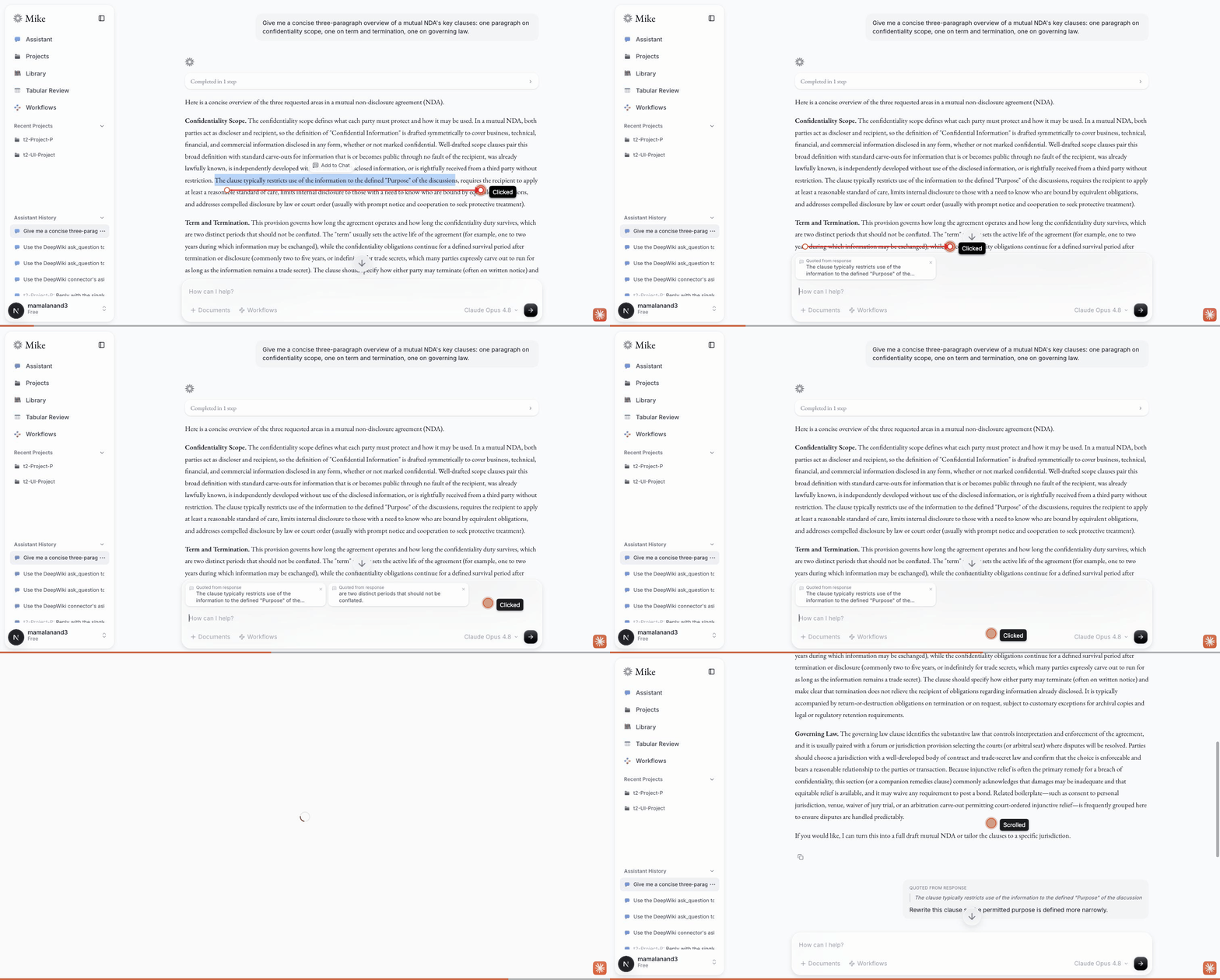
/assistantand send any message that produces a prose response. - Highlight a sentence inside the response - an "Add to Chat" popup appears just above the highlight.
- Click it. A chip labelled "Quoted from response" appears above the composer with the excerpt clamped to two lines (full text on hover).
- Highlight a second passage and click again - chips stack.
- Click a chip's ✕ - that chip is removed, the others stay.
- Type a question and send. The sent user bubble shows the excerpts as styled quote blocks above your text; the chips are gone from the composer.
- Reload the chat. The quote blocks persist and still render as quotes, not as
literal
>characters. - Repeat 2-7 in a project assistant chat and in a tabular review's chat panel.
Edge cases worth poking
- Highlight text in a user bubble, in the composer, or in the document viewer → no popup.
- Start a drag inside one response and end it in the next → the chip contains only the first response's text.
- Highlight, then press Escape / scroll the transcript / click elsewhere → the popup goes away.
- Highlight, then press Enter with focus outside a text field → the excerpt attaches. Press Enter in the composer → it still sends, as before.
- Select a very long passage (>4,000 chars) → the chip is capped at a word boundary and a notice says it was shortened.
Tradeoffs and design decisions
Excerpts ride inside
contentrather than a structured request field. Buys zero backend change, zero migration, working history replay, and a self-contained persisted message. Costs machine-distinguishability: a user who types the exact preface line and a blockquote will see their own quote styled as an attached excerpt. The parser fails closed on everything else, so the blast radius is cosmetic. If a later PR needs excerpt provenance (which message, which offsets), that is the moment to promote it to a real field - this format is a deliberate floor, not a ceiling.Whitespace-collapsed excerpts. A DOM range gives concatenated text nodes with no block boundaries, so a multi-paragraph highlight becomes one run-on line. Recovering the breaks needs a walk of the cloned fragment emitting newlines at block edges. Left out to keep this PR small; the encoding already round-trips newlines, so adding it later is a change to one function.
data-mike-quotableon the prose div, not the message wrapper. Excludes reasoning blocks, edit cards, download cards, and the citation list. This also means a selection spanning twocontentevents in one message clamps to the first - consistent with the cross-bubble rule, and cheap to widen later.Selections spanning bubbles clamp rather than bail. Bailing punishes a slightly-too-long drag; quoting across bubbles puts text in the chip the user never highlighted as one thought. Clamping to the drag's origin bubble is truthful and matches what the highlight looked like.
Excerpt state lives in
ChatInput(imperative, likeaddDoc) but on the panel inTRChatPanel. The two composers differ:ChatInputis shared by two pages and already owns the adjacent document chips, so keeping the state there avoids duplicating it at both call sites.TRChatInputis used once and its popup is a panel-level child, so the state sits next to the popup instead.Cap-and-notify rather than reject. A 4,001-character selection that silently does nothing is worse than one that attaches, cuts at a word boundary, and says so.
Enter activates the popup, guarded. Native button focus covers Tab users; a document-level Enter handler covers the case where nothing is focused. It bails whenever the event target is an input/textarea/contenteditable so it can never steal "send" from the composer.
Demo
Recorded live against this branch (dev stack, real Claude response): highlight → popup → chip attaches → second highlight stacks → chip removed → send → the excerpt renders as a styled quote in the sent bubble → page reload → the quote persists.
Testing performed
npm test --prefix frontend- 711 passed / 103 files (baseline 618/97; +93 new tests, no existing test changed behavior)npm run test:coverage --prefix frontend- 100% statements / 97.81% branches / 100% functions / 100% lines. Branches up from the 97.69% baseline;lib/quotedExcerpts.tsis fully covered. Ratchet floors (99/97/100/100) respected; no floor raise, since nothing crossed a whole-percentage boundary.npm run lint --prefix frontend- 0 errors, 35 warnings (byte-identical to baseline)npm run build --prefix frontend- compiled successfullynpm test --prefix backend- 804 passed. Oneuser.routesMFA case flaked with "socket hang up" and passes in isolation; no backend file is touched by this PR.git diff --check- clean
New tests, by layer:
lib/quotedExcerpts.test.ts- 37 cases: normalization, capping at word and hard boundaries, build/parse for single, multiple, multi-line and empty-body messages, fail-closed cases (ordinary prose, a user-authored blockquote, a bare preface line), and a table-driven round-trip suite.hooks/useQuotableSelection.test.tsx- 16 cases: capture inside a response, rejection in user bubbles and outside the container, collapsed and whitespace-only selections, cross-bubble clamping, dismissal on collapse / Escape / scroll / resize, the clear() latch, keyboard selection, disabled mode.components/shared/QuoteSelectionPopup.test.tsx- 14 cases: placement above, flipped below, all four viewport clamps, click and Enter activation, the text-field Enter guard, Shift+Enter, teardown, and body portalling.components/shared/QuotedExcerptChip.test.tsx- 9 cases: clamping, title fallback, accessible remove names, removal index, truncation notice.components/shared/QuotedMessageContent.test.tsx- 6 cases: plain passthrough, single and multiple quote blocks, quotes-only messages, and a user-authored blockquote left alone.components/assistant/ChatInput.quotedExcerpts.test.tsx- 10 cases: chip attach/stack/dedup/remove, capping notice, unchanged content with no excerpts, content prefixing on send, clear-on-send, and chips surviving a refused send.components/assistant/UserMessage.test.tsx- 2 added cases asserting the wire format never leaks into the bubble as literal>characters.
Playwright was not needed: every behavior has a unit-level assertion.
🤖 Generated with Claude Code
Our analysis
Add quoted response context to chat — read the full analysis →
Think the analysis missed something the PR description covers?
Capture this PR into my fork
Download a Markdown prompt that tells Claude how to port every
commit in this PR into your working tree. Run it via
claude -p < capture-pull-384.md from
inside the repo you want the changes in.