[Connectors] Google Drive + Slack + any MCP server, with two self-host setup pathways
From the PR description
What this is
The connectors story for legal teams, in one PR: first-party Google Drive, Slack via its hosted MCP server, and any other remote MCP server - with two clearly separated setup pathways so a firm can self-host Mike and wire up its own integrations, and so that the person who clicks Connect on an unconfigured server is told what to set up instead of being handed a dead end.
Rebased onto main @ dd91a85b on 2026-09-03; head c0c33fdf. Previous tip 869a8082 was CONFLICTING with main; this one applies cleanly.
The two pathways
1. Zero-setup - the server registers itself. Any MCP server that supports dynamic client registration (RFC 7591), or that uses a bearer token / custom headers, connects with nothing configured on the Mike server. Settings → Connectors → Add → paste URL (or click a preset) → consent popup → tools discovered.
2. Bring-your-own OAuth app - register a client once per deployment. Google and Slack don't implement RFC 7591, so the self-hoster creates one OAuth client and sets env vars; every user of the deployment then connects their own account with one click. Until that is done:
- Google Drive (first-party) disables its Connect button and prints the exact redirect URI to register on the card, so the operator copies it rather than assembling it.
- MCP connectors (Slack, Google MCP) accept the connector, then refuse the OAuth start with a typed
connector_setup_requirederror whose text is the full provider-console walkthrough - env var names, the "Slack MCP Server"/PKCE toggles, and this deployment's redirect URI. The Add modal renders it as a setup notice above the form. Nothing else from the MCP path reaches the browser un-sanitized (see Tradeoffs).
Per-provider OAuth quirks (Google's access_type=offline/prompt=consent and versioned-endpoint trap; Slack's endpoint hint; each provider's setup text) live in one registry table, backend/src/lib/mcp/providers.ts - adding the next provider for lawyers is one table row.
Redirect URIs, once and for all. Every callback is derived from API_PUBLIC_URL, which on current main means the browser-reachable frontend gateway including /api (the frontend proxies /api/* to the backend). So the URIs to register are:
API_PUBLIC_URL |
Google Drive | MCP (Slack, Google MCP) | |
|---|---|---|---|
| Local dev | http://localhost:3000/api |
http://localhost:3000/api/user/integrations/google-drive/oauth/callback |
http://localhost:3000/api/user/mcp-connectors/oauth/callback |
| Production | https://<your-mike-host>/api |
https://<your-mike-host>/api/user/integrations/google-drive/oauth/callback |
https://<your-mike-host>/api/user/mcp-connectors/oauth/callback |
The earlier revision of this PR documented http://localhost:3001/user/... (the backend's own port) - that was true before main moved callbacks behind the gateway and is now wrong everywhere it appeared; README, .env.example, the Slack manifest, and the in-product setup text all say the gateway form now.
Base-case replication - what main does and doesn't do today
Measured against main @ dd91a85b. No credentials needed for steps 1-3.
1. Look at what exists on main. Boot the stack on main, sign in, open Settings → Connectors (/settings/connectors):
- You get a list of MCP connectors and an Add modal that takes a hand-typed server URL, a bearer token, and custom headers. That is the whole surface.
- No Google Drive card.
grep -c "Google Drive" 'frontend/src/app/(pages)/settings/connectors/page.tsx'→0onmain. - No presets.
grep -c Slack frontend/src/app/components/settings/NewMcpModal.tsx→0. To reach Slack you must already know the exact stringhttps://mcp.slack.com/mcp; nothing in the product tells you.
2. Try to connect Slack on main. Add → paste https://mcp.slack.com/mcp → Connect. The SDK's fallback for "no OAuth client configured" is RFC 7591 dynamic registration, which Slack does not implement, so the flow dead-ends with the fixed string "Connector authorization could not be started." There is no SLACK_MCP_OAUTH_* env var to set - grep -n "MCP_OAUTH" backend/.env.example on main returns nothing, because the MCP OAuth vars are undocumented there. Reading backend/src/lib/mcp/oauth.ts is the only way to discover that a GOOGLE_MCP_OAUTH_* / MCP_OAUTH_* prefix pair even exists.
3. Confirm Google Drive is simply absent.
ls backend/src/lib/integrations/          # No such file or directory
grep -rn "google_drive" backend/src/ | wc -l    # 0
ls backend/migrations/ | grep google_drive      # nothing
4. The Google-MCP token expiry, if you have a Google client to test with. main's OAuth code sends no access_type=offline and no prompt=consent. Google only issues a refresh token when a request opts into offline access, so on main a Google MCP connector authorizes, lists tools, and then stops working once the first access token expires (~1 hour) with no way to recover but a manual reconnect.
5. One latent hostname-matching bug. main's provider selection is hostname.endsWith("googleapis.com"), which also matches evilgoogleapis.com, handing an attacker-chosen host the deployment's Google OAuth client credentials. This branch replaces it with an exact-or-dot-suffix match plus FQDN trailing-dot normalization (providers.ts, normalizedHostname), covered by providers.test.ts.
PR replication - verify on this branch
git fetch origin && git checkout olp-pr/connectors # c0c33fdf
Boot (local, no credentials). docker compose up -d gives you the whole stack (db-init now replays the Drive migration on existing volumes too), or run the infra services in compose and npm run dev in backend/ and frontend/ with API_PUBLIC_URL=http://localhost:3000/api and API_BASE_URL=http://localhost:3001 in frontend/.env.local - that is exactly how the recordings below were made.
A. Zero-setup pathway - fully reproducible, no credentials, no env vars.
- Sign in, open Settings → Connectors → Add.
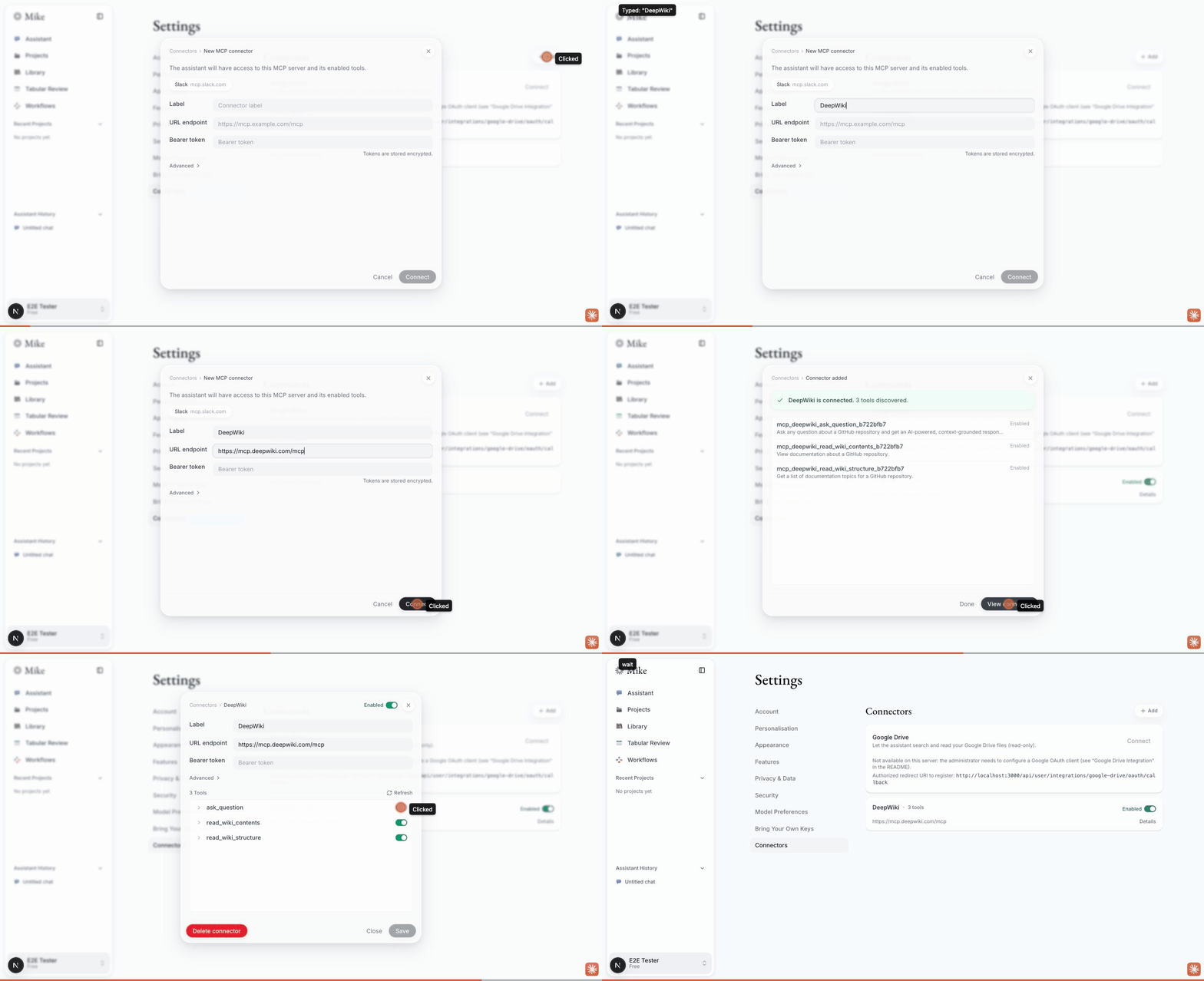
- Paste any public MCP server that supports dynamic registration - the recording uses DeepWiki's hosted endpoint,
https://mcp.deepwiki.com/mcp. - Connect. Tools are discovered and listed; toggle one off and it disappears from the assistant's tool set.
- Ask something in chat that needs it - the tool call runs and the answer comes back from the result.
- Negative check (unchanged from
main): anhttp://server URL is rejected by the SSRF guard. - Delete the connector; the row and its tools go.
B. Slack preset + the setup notice - no credentials needed.
- Settings → Connectors → Add. There is a Slack chip above the form (
NewMcpModal.tsx,CONNECTOR_PRESETS). Click it -name/serverUrlprefill toSlack/https://mcp.slack.com/mcp. - With
SLACK_MCP_OAUTH_CLIENT_IDunset, click Connect. The connector is created, and the modal returns to the form with a notice titled "This server needs a one-time setup by the administrator" carrying the full Slack walkthrough and this deployment's redirect URI (http://localhost:3000/api/user/mcp-connectors/oauth/callbacklocally). On the previous tip this was the fixed string "Connector authorization could not be started." with the real text only in the backend log. - Network tab:
POST /api/user/mcp-connectors/<id>/oauth/start→400 { code: "connector_setup_required", detail: "<the instructions>" }.
C. Google Drive card - no credentials needed for the not-configured states.
- With
GOOGLE_DRIVE_OAUTH_CLIENT_ID/_SECRET(and theGOOGLE_MCP_OAUTH_*fallback) unset, open Settings → Connectors. The Google Drive card shows Connect disabled, the note "Not available on this server: the administrator needs to configure a Google OAuth client...", and beneath it "Authorized redirect URI to register:http://localhost:3000/api/user/integrations/google-drive/oauth/callback". Backing route:GET /user/integrations/google-drive→{ connected, scope, configured, schemaReady, redirectUri }. - Set the two env vars to any non-empty placeholder and restart the backend: the note disappears and Connect enables. (With a placeholder client Google itself will reject the flow - this step only exercises the configured/unconfigured branch.)
- Missing-migration state (new): on a DB without the Drive tables the status endpoint now answers
schemaReady: falseinstead of 500, the card says "the database is missing the Google Drive migration (backend/migrations/20260903_01_google_drive_integration.sql)", and Connect stays disabled. To see it:psql ... -c "drop table public.user_google_drive_tokens, public.google_drive_oauth_states"on a throwaway DB, reload the page, then re-apply the migration.
D. Real Google / Slack consent - requires the human-only setup below. Complete the provider walkthrough, set its env vars, restart, click Connect, approve consent, keep the popup open until it self-closes (Google severs the opener, so Mike polls). Then in chat: google_drive_search, google_drive_read_file, google_drive_list_recent for Drive; Slack's discovered tools for Slack. Disconnect revokes the grant and deletes stored tokens; reconnecting always re-shows consent.
Live evidence (2026-09-03, this tip, local stack: compose infra + npm run dev on :3000/:3001)
Slack preset → setup handover (no credentials configured). Add → Slack chip → Connect. The connector is created, refresh answers 409 oauth_required, the OAuth start answers 400 connector_setup_required, and the Add modal hands over to the new connector's details modal with the full Slack walkthrough and this deployment's redirect URI. Before the 409 fix this exact click bounced the user to the login page.
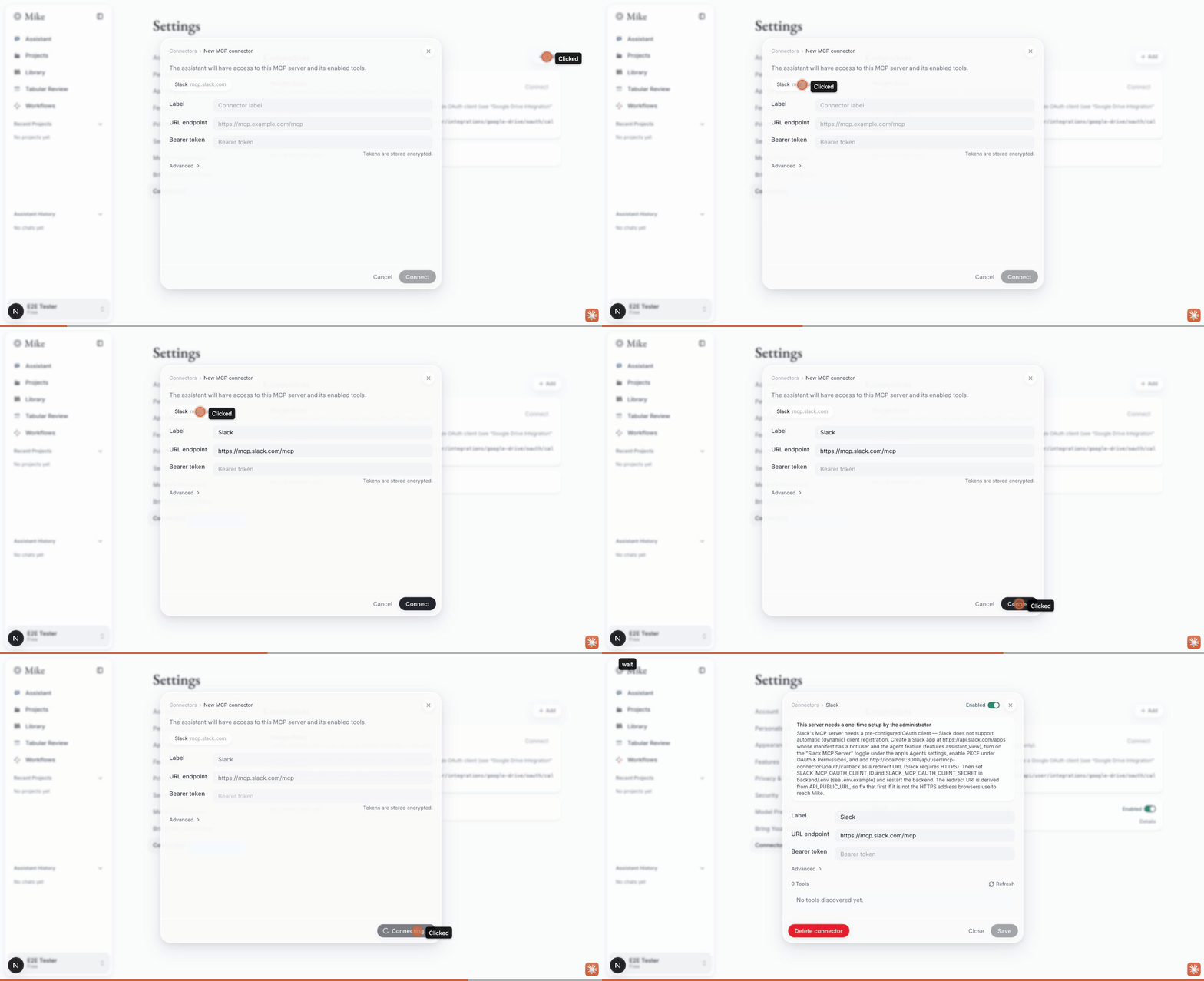
Zero-setup pathway (DeepWiki, RFC 7591). Add → paste https://mcp.deepwiki.com/mcp → Connect → 3 tools discovered → View connector → toggle a tool off.
Google Drive card, both states. Unconfigured: Connect disabled + "Authorized redirect URI to register: http://localhost:3000/api/user/integrations/google-drive/oauth/callback". Then with GOOGLE_MCP_OAUTH_CLIENT_ID/_SECRET set (the Drive fallback) and the backend restarted: Connect enabled → popup opened → page polls with a Cancel affordance. Following the generated authorization URL by hand, Google answered redirect_uri_mismatch for http://localhost:3000/api/user/integrations/google-drive/oauth/callback - i.e. the flow reaches Google with exactly the URI the card told us to register, and fails only because that URI is not yet on the owner's OAuth client (it was registered for the old localhost:3001 form). That is the one console action left for the owner; everything up to it is verified.
Slack, configured. With SLACK_MCP_OAUTH_CLIENT_ID/_SECRET set: create 201 → refresh 409 oauth_required (session intact) → OAuth start 200 → "Authentication required" step with Cancel → popup to slack.com/oauth carrying the PKCE challenge, the MCP scope list and redirect_uri=http://localhost:3000/api/user/mcp-connectors/oauth/callback. Slack refuses at that point ("Something went wrong when authorizing...") because the redirect URL is plain HTTP and not registered on the app - expected; the HTTPS-tunnel recipe below is the fix, and the app's redirect-URL edit is a console action only the app owner can do.
Not exercised here: an in-chat tool call. No model-provider key on this machine is valid (Anthropic: authentication_error; OpenAI: placeholder; Gemini: known-invalid), so the chat returns "Sorry, something went wrong" for every model regardless of connectors. The tool wiring is unchanged from the previous revision, where the DeepWiki read_wiki_structure call was verified live on Claude Sonnet.
Tradeoffs & design decisions
1. The setup text is the one connector error that reaches the browser verbatim - by construction, not by exception. main's posture forbids returning SDK-derived text to clients, because the MCP SDK embeds entire upstream response bodies (Google's full HTML 400 page included) in Error.message. Every MCP management route therefore still returns a fixed string for generic failures. The new ConnectorSetupError (backend/src/lib/mcp/errors.ts) carries only text this repository authors - the provider registry's setupInstructions or the Drive integration's own copy - with the deployment's own redirect URI interpolated, so the two OAuth-start routes allowlist that class and nothing else. Cost: one more error class and a code the frontend switches on. Rejected alternative: loosening the sanitization rule for "short" messages - there is no safe way to tell our string from the SDK's once both are an Error.
Side effect worth reviewing: the Drive start route previously returned { detail: err.message } for every failure (DB, crypto, anything). It now returns a fixed string unless the error is the typed setup error. That is a tightening, covered by connectors.routes.test.ts.
2. main's background token refresh wins over this branch's deletion of it. An earlier commit on this branch deleted refreshOAuthAccessToken/storeOAuthToken as unreachable. Since then main (#294, durable queues) added an mcp.refresh_token job that calls exactly that function, so the deletion was dropped during the rebase rather than re-applied. Nothing else in the branch depended on it.
3. Google Drive is first-party REST, not MCP. Google's Drive MCP server is gated behind the Workspace Developer Preview Program: without org enrollment, OAuth succeeds and tools list, then every tool call returns PERMISSION_DENIED. Building Drive on the GA Drive REST API means a firm needs only an ordinary OAuth client. Cost: a second OAuth pathway, its own token tables and migration, and three hand-written tools. The MCP route to Google is still supported for anyone enrolled.
4. One provider registry, not per-provider branching. Cost: indirection for exactly two providers today; the bet is that provider three arrives.
5. Slack gets a preset; Google deliberately does not. Drive ships as a first-party card, and the Google MCP endpoint needs the versioned URL (.../mcp/v1) a human must type - a preset would silently rot. Presets stay presentational so they cannot diverge from the hand-typed flow.
6. OAuth completion by polling, not postMessage. COOP can sever window.opener; the page polls connector state and offers a Cancel escape hatch. Cost: extra requests during the consent window.
7. The Slack manifest requests write scopes. docs/slack-mcp-app-manifest.example.json includes chat:write, reactions:write, canvases:write alongside read/search - user consent grants write, not just read. Called out in the setup steps rather than buried. org_deploy_enabled: false (single workspace) is likewise deliberate.
8. schemaReady is detected from the error code, not a schema query. The status route treats PostgREST PGRST205 / Postgres 42P01 on the token table as "migration missing" and everything else as a real failure. Cost: if PostgREST ever renames the code the card degrades to the old 500 → "not available" behaviour, never to a false "ready".
9. Token storage. Drive access/refresh tokens are encrypted at rest in user_google_drive_tokens; RLS is enabled with no user policies, so only the service key reads them. OAuth state rows are short-lived and hold an encrypted config blob.
⚠️ Human-only setup - the steps no agent can do for you
Everything below requires a human: provider-console access, workspace/admin authority, or an approval judgment. Everything not listed here (code, env plumbing, the migration on a reachable DB, restarts) is done or scripted.
Deployment-wide, first
API_PUBLIC_URLmust be the address browsers use to reach Mike, with/api-http://localhost:3000/apilocally,https://<your-mike-host>/apiin production (mainrequires it in production and refuses non-HTTPS). Every redirect URI below is derived from it; the product shows you the derived URI so you never have to assemble it. A value that does not byte-match what the provider has on file fails asredirect_uri_mismatch.- OAuth client secrets exist only in the provider consoles - keep them in
backend/.env, never in the repo.
Google Drive (first-party) - once per deployment
- Google Cloud Console: pick or create a project. Enable the Google Drive API (
drive.googleapis.com) - the only API the first-party integration needs. - OAuth consent screen - pick the user type for who will connect (
drive.readonlyis a Google restricted scope, so this decides your verification burden):- Self-hosting for your own Google Workspace org (the typical firm): Internal. No user cap, no Google verification, no CASA assessment, no token expiry. The Cloud project must be owned by the org.
- Hosting for outside users (consumer Gmail, multiple firms, the upstream-hosted instance): External. In Testing, only 100 listed test users can connect (add each connecting user's Google address) and their refresh tokens expire every 7 days - pilot mode, not steady state. Published-but-unverified carries a lifetime 100-user cap. Beyond that you need Google's restricted-scope verification incl. an annual CASA assessment - paid once per deployment by its operator.
- Credentials → Create credentials → OAuth client ID → Web application, and register the redirect URI the Drive card shows you:
https://<your-mike-host>/api/user/integrations/google-drive/oauth/callback(local dev:http://localhost:3000/api/user/integrations/google-drive/oauth/callback- Google accepts plain-HTTPlocalhost, so no tunnel is needed for Drive). If one client will also serve Google MCP connectors, add.../api/user/mcp-connectors/oauth/callbackto the same client. - Copy the client ID/secret into
backend/.envasGOOGLE_DRIVE_OAUTH_CLIENT_ID/_SECRETand restart the backend. Fallback: if unset, the code reusesGOOGLE_MCP_OAUTH_CLIENT_ID/_SECRET(one-directional; the MCP path never readsGOOGLE_DRIVE_*). - Existing non-compose deployments only: apply
backend/migrations/20260903_01_google_drive_integration.sql(idempotent). Compose users get it fromdb-initon the nextdocker compose up; fresh installs get the tables fromschema.sql. If you forget, the card now tells you exactly that.
Then, per user: Connect on Settings → Connectors, sign into the Google account whose Drive should be readable (a listed test user while the app is in Testing), approve consent, keep the popup open until it closes itself. MFA-enrolled users verify first. Disconnect revokes the Google grant and deletes stored tokens; re-connecting always re-shows consent (prompt=consent).
Google-hosted MCP servers (optional; distinct from the first-party integration)
- Your Workspace admin must enroll the org in the Google Workspace Developer Preview Program; without it OAuth succeeds and tools list, but every call returns PERMISSION_DENIED.
- Enable both the base API and the per-server MCP service (for Drive:
drive.googleapis.comanddrivemcp.googleapis.com). - Set
GOOGLE_MCP_OAUTH_CLIENT_ID/_SECRET; register.../api/user/mcp-connectors/oauth/callback. - At add time, paste the versioned URL
https://drivemcp.googleapis.com/mcp/v1- Google's own discovery metadata advertises the unversioned/mcp, which returns an opaque 400 (the registry logs a hint for exactly this case).
Slack - once per deployment
- Create the Slack app at api.slack.com/apps (needs app-creation rights). Fastest: From an app manifest, paste
docs/slack-mcp-app-manifest.example.json, replace the redirect-URL placeholder withhttps://<your-mike-host>/api/user/mcp-connectors/oauth/callback. Know what you're granting: mostly read/search, but alsochat:write,reactions:write,canvases:write. - Flip the two toggles the manifest cannot express: "Slack MCP Server" under the app's Agents settings, and PKCE under OAuth & Permissions. If the Agents toggle isn't there, Slack hasn't enabled MCP for your workspace/plan - no repo-side change can fix that.
- Slack requires HTTPS redirect URLs, so local development needs a tunnel pointed at the frontend:
cloudflared tunnel --url http://localhost:3000, thenAPI_PUBLIC_URL=https://<tunnel-host>/apiinbackend/.env(restart) andhttps://<tunnel-host>/api/user/mcp-connectors/oauth/callbackon the Slack app. Quick tunnels get a new hostname on every start - update both each time. (FRONTEND_URLcan stayhttp://localhost:3000; only the callback goes through the tunnel.) - On workspaces with app approval enabled, a Workspace Owner/Admin must approve the app before any member's consent succeeds.
- Copy the app's Client ID/Secret (Basic Information → App Credentials) into
SLACK_MCP_OAUTH_CLIENT_ID/_SECRETand restart the backend. - Enterprise Grid: the manifest ships
org_deploy_enabled: false. Org-wide deployment is an Org Owner decision and a manifest change.
Then, per user: Settings → Connectors → Add → Slack preset → approve Slack's consent screen with their own account. What the assistant can reach is exactly what that user can see in Slack - including private channels and DMs they're in.
What changed in this revision (2026-09-03)
- Rebased onto
main@dd91a85b(was54681b55). Two conflicts:.env.example(kept both blocks) andmcp/oauth.ts(dropped this branch's deletion of the refresh path - Tradeoff 2). - Redirect URIs follow
main's gateway model. README,.env.example, the Slack manifest placeholder and the in-product setup text now name<API_PUBLIC_URL>/user/.../oauth/callback, i.e.http://localhost:3000/api/...locally. The duplicateAPI_PUBLIC_URLkey this branch had added to.env.example(with a now-wrong "falls back to BACKEND_URL" comment) is gone;main's single key stays. - Setup instructions reach the browser (
ConnectorSetupError,connector_setup_required; modal notice; Drive card redirect URI) - closes the open design question from the previous revision. - Drive status knows about the migration (
schemaReady), and the Drive start route no longer echoes arbitrary error messages. - Migration re-dated
20260825_05→20260903_01so it sorts aftermain's newest (20260901_03) and is not skipped by "apply everything newer than my version"; header now carries-- Migration date:perAGENTS.md. - Added to
docker-compose.yml'sdb-initreplay list -mainnow enforces this withcomposeMigrations.test.ts, which failed on the previous tip (the test did not exist when that tip was cut). - Provider setup texts now say the redirect URI comes from
API_PUBLIC_URL, so an operator whose URI looks wrong knows which knob to turn.
Testing
Automated, on this tip (c0c33fdf), run locally on the rebased tree:
| Suite | Result |
|---|---|
Backend tsc --noEmit |
clean |
Backend vitest run |
1166 passed, 34 skipped (107 files) |
Frontend tsc --noEmit |
clean |
Frontend vitest run |
790 passed (118 files) |
New/changed tests: backend/src/__tests__/integration/connectors.routes.test.ts (6, supertest - setup text verbatim on both start routes with the gateway-derived URI, everything else sanitized, refresh answers 409 not 401, status carries redirectUri), oauth.test.ts (+1 typed-error assertion), googleDrive.test.ts (+3: typed error, schemaReady false on PGRST205, unrelated DB errors still thrown), page.test.tsx (+3: setup handover opens the details modal with the notice, Drive card shows the redirect URI, missing-migration note with Connect disabled), composeMigrations.test.ts now passes (it failed on the previous tip).
Live, in Chrome, on a local stack - see "Live evidence" above. Both recordings were made against this tip.
CI on c0c33fdf: 12 of 14 checks green (backend/frontend build+tests, Playwright, Supabase stack, fresh-vs-upgraded schema drift, CodeQL, gitleaks, CLA, root/frontend dependency audits). The two red ones are dependency-audit (word-addin) - the audit gate now sees two Browserslist advisories (GHSA-c83g-rgw3-j3cx, GHSA-73wf-gq98-2v4g) published after main's last green run, in a package this PR does not touch - and dependency-audit (backend), which was cancelled by fail-fast, not failed. #422 absorbs those advisories; this PR goes green once it lands (or after a rebase onto it).
Open items
- CLA: one historical committer (
hordruma) on the Google-MCP commits has not signed; those two commits were re-authored in the previous revision, so the check is green - noting it for provenance. - Live Slack consent still needs the owner's tunnel + app (redirect-URL edit on the Slack app is a console action). Recipe above, verified as far as the console gate.
🤖 Generated with Claude Code
Our analysis
Add self-hosted Google Drive, Slack, and MCP connectors — read the full analysis →
Think the analysis missed something the PR description covers?
Capture this PR into my fork
Download a Markdown prompt that tells Claude how to port every
commit in this PR into your working tree. Run it via
claude -p < capture-pull-346.md from
inside the repo you want the changes in.